Making Improvements
I recently did a release party for the app and I learned a lot. The biggest thing I learned is that people are definitely willing to support me in so many ways and that feels awesome. Many folks wanted to come but weren’t able to make it, and some of the folks that did arrive, I never saw coming.
Life is full of surprises and this app was certainly one of them for me. Tonight, I just implemented some code that came directly from me watching people test the game (I want to stop calling it an app).
What’s New in v1.1.0
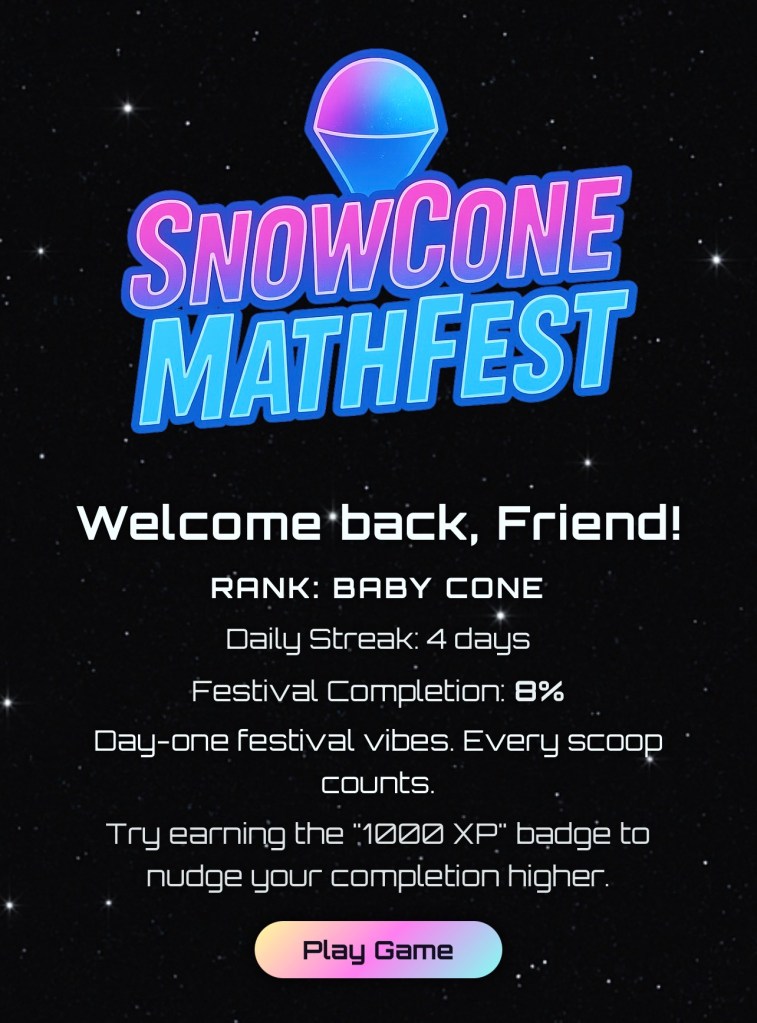
Updated intro screen layout with a tighter, more polished welcome.
Infinity Mode progress now saves instantly — no more losing your run if you leave early.
Badges + trophies are more reliable when you exit mid-session (scores/streaks commit on exit).
Cleaner Infinity feedback with more specific coaching after each set.
Badge toasts moved to the top so they don’t cover gameplay controls.
It’s nice to just be making these type of quality of life upgrades at this point. I’m so tired though. I was up until 3:30am this morning stuck trying to push (the wrong folder) to Xcode and getting frustrated. As always, I almost quit coding. I probably only say that to make Patch worry, but foreal, I feel that way sometimes. Last night’s session was one of those moments where I got stuck in a spot that quick prompt wasn’t going to explain me out of.
I don’t vibe code. I do AI assisted coding and sometimes my assistant wants to do everything but the right thing. Patch is a spaghetti lord. He doesn’t care how many lines of code you end with as long as it works; so you end up with a game size menu screen because you couldn’t get the helper of a helper of a helper to get a scroller to reposition properly…..No….A human made this app and you can tell.
Thus I give you v1.1.0, fixing the error of my ways. The new intro screen really pops and Infinity Lake needed fixing bad…the score system wasn’t remembering hard earned points if the player didn’t his the end Infinity button. So that definitely needed fixing. In addition to those upgrades, I removed the universe specific diction of the intro screens for more straightforward instructions. I didn’t really want to, but I have realized after the party that some people REALLY need instructions. I grew up in the 90’s when we weren’t bombarded with hour long tutorial modes, so I intended the app to be an exploratory experience. I think that works well when a person is interested, but for others looking to understand the game, it may have been leaving them with more questions than answers.
I think the funniest thing about the game is watching adults realize how bad they are at basic math lol. I’m not trying to be mean, that’s literally why I made the game. People need to do more with their brains, and this app is a straight forward math experience in many ways. I’m not dressing up addition and multiplication, I wanted that. I wanted to practice rapid fire math problems, and when I watch people play, their faces turn sour, their brows flex, and for some folks their quittin’ muscles start kicking in. That’s unfortunate, but realistic to expect that the game can feel a little bit like a quiz sometimes. Quiz or not, there are other modes that offer much more than 2 + 2.
This doesn’t feel like my last update. I still have a showdown with the silence button on iPhones that I’m dreading; I want to redo some artwork for the icons and backgrounds; Grampy P is fine, but he needs more listening flexibility to truly interact the way I want him to; finally, I’ll just keep listening to people and playing through the app to test it, seeing and implementing what it needs.
With over 20 copies sold so far, I really feel like this thing is worth updating, worth mentioning, and worth buying. If sales keep coming in, I keep deving this thing, I keep buying new supplies, I keep staying up until 3am lol. If sales don’t….I probably keep doing this anyway..
Y’all stay frosty..
and please…
Buy SnowCone MathFest


 JPS Grooves
Leave a comment